
News
ID Card Software updates
Looking for an updated reference manual or demo videos for your ID Card software? We get a decent number of requests for manuals for the Asure, ID Flow, and Zebra Card Studio card design software applications. Visit our ID Card [...]

QR Codes: the high-tech, low-cost Smart ID Card solution
Confirming someone’s identity before giving them access to facilities or work sites is crucial for your security. In the past, most organizations used passive photo ID cards to prove identity. Now a days, Smart ID Cards are being used within [...]
Evolis Tattoo 2 – Warranty Trouble Shooting Guide
Minimal trouble shooting is required to obtain a Warranty Repair RMA Card Feed Issues Run a self test to check functionality of the printer Update the printer firmware and driver Run a cleaning cycle Check for static build up on [...]

ASAP Offers NFC Tag Management Platform
Near Field Communication (NFC) is the next generational evolution of the 13.56MHz contactless standard and is soon to be a ubiquitous technology that allows us to extend our digital lifestyles into the physical world. NFC is a set of standards [...]
HID Announces New C50 Printer
httpv://youtu.be/DVKSLKSqusQ

Fargo introduces the next generation of DTC ID card printers
HID Fargo has released several new printers: C50 - new entry-level card printer. This is an affordable single sided printer which includes the Swift ID™ badging software to produce professional ID badges at an affordable price. [...]
No Tools Required – Changing the Print Head on the Evolis Primacy
Evolis' unique design enables you to replace your print head - no tools required. A printer's print head determines print quality and is a highly sensitive component, therefore regular maintenance and a dust-free environment is essential to ensure a long [...]
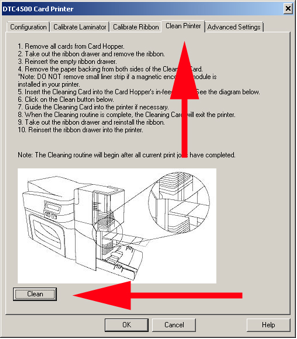
How to Clean a Fargo DTC4500 ID Printer
Follow the steps below to clean your DTC4500: Go to your printers and faxes folder Right click on the Fargo DTC4500 Click printing preferences Click on the tool box tab Click on the clean printer tab and follow the instructions