
News
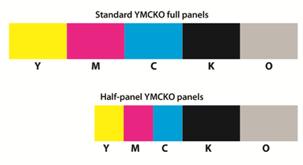
What is the difference: Full-Panel v. Half-Panel color ribbon?
For most companies, color badges are a requirement. Some use full color fronts only and others use full color fronts and backs. These ribbons can get pricey, though, so is there any way to save on your print costs? The [...]

Jolly Technical Support Plans
Protect your investment by purchasing a Technical Support Plan for your eligible software product¹. To purchase a Technical Support Plan, contact a Jolly customer service representative or the vendor where you purchased your software. Download Service Level Agreement Gold Coverage [...]
FARGO: Enabling Printer Communication with RFIDTagged Consumables
Fargo Tech Update This guide describes the process for enabling a card printer/encoder to communicate with print ribbon and overlaminate consumables that have radio-frequency identification (RFID) tags. The affected printers use consumables with tags that must be transitioned to an [...]
HID Global Upgrade Requires Firmware Update beginning October 31, 2013
HID Global will be upgrading the RFID communication technology utilized by some print ribbon and overlaminate consumables used in FARGO Card Printer/Encoders beginning in October 2013. After HID implements the new technology, most in-field printers and laminators that were manufactured [...]
Announcing the New ZXP Series 1™ and the Enhanced ZXP Series 3™
Zebra is pleased to announce the latest addition in their expanded lineup of ZXP card printers—the ZXP Series 1™— along with exciting enhancements to their professional ZXP Series 3™ product line. Both the ZXP Series 1 and ZXP Series 3 [...]
Fargo Tech Update 325
Click on the links below to see the Fargo Tech Update 325 Utilities. Tech Update 325 WORKBENCH (PDF) Tech Update 325 PRINTER DRIVER (PDF)
ID Flow – Hidden Files
When you are in ID Card Issue Center and open the ID Card Designer to modify your template, the templates get saved in C:ProgramFiles(x86)JollyTechnologiesIDFlowSampleDesigns You can also find this by selecting import/export when in Properties under the “Badge Printing” tab.
Jolly Tech Troubleshooting
If you are experiencing a problem with your installation of Jolly software, review the following solutions to see if they may resolve your issue. License Key / Registration If you are prompted to enter your license key every time you [...]